

Written by Team Wizikey
April 18, 2024
Introducing Our Latest Feature: Reports in PPT Format!
Introducing Our Latest Feature: Reports in PPT Format! Hello, report wizards! We’re excited to roll out a new feature that’s sure to add a little extra sparkle to your workday: Reports are now available in PowerPoint (PPT) format! 🎉 Why PowerPoint? We’ve all been there—staring at endless streams of data and wishing there was a […]


Introducing Our Latest Feature: Reports in PPT Format!
Hello, report wizards! We’re excited to roll out a new feature that’s sure to add a little extra sparkle to your workday: Reports are now available in PowerPoint (PPT) format! 🎉
Why PowerPoint?
We’ve all been there—staring at endless streams of data and wishing there was a simpler way to make sense of it all and share our insights. Well, wish no more! PowerPoint is a beloved tool for presenting complex information in an easy-to-digest and visually appealing format. And now, combining it with our cutting-edge coverage reports, you have the ultimate tool at your fingertips to impress your boss and dazzle your colleagues.
What’s New?
🌟 Effortless Integration
With a PDF format already in place, our new PPT format allows you to seamlessly transition from raw data analysis to a polished presentation in minutes. Forget the hassle of converting CSV files or pdf screenshots into slides. With just a few clicks, your report data insights are ready to be showcased in a professionally designed PowerPoint template.
📊 Dynamic Charts and Graphs
Visualize your data like never before! Our PPT reports include dynamic charts and graphs that not only look stunning but also provide deep insights at a glance.
🔗 Easy Sharing
Sharing your insights has never been easier. PowerPoint presentations are universally accessible and can be shared across multiple platforms, ensuring that your team, clients, or stakeholders can view your report anytime, anywhere. Whether it’s during a remote meeting or in a conference room, your reports are ready to go whenever you are.
How to Get Started?
Getting your hands on these sleek, informative PowerPoint reports is as easy as pie:
1. Log in to your account: Head over to your dashboard.
2. Generate your report: Select the report you need and choose the ‘Generate PPT’ format option.

3. Wait: A few minutes until your report is generated in PPT. Once it is ready, select ‘download PPT’
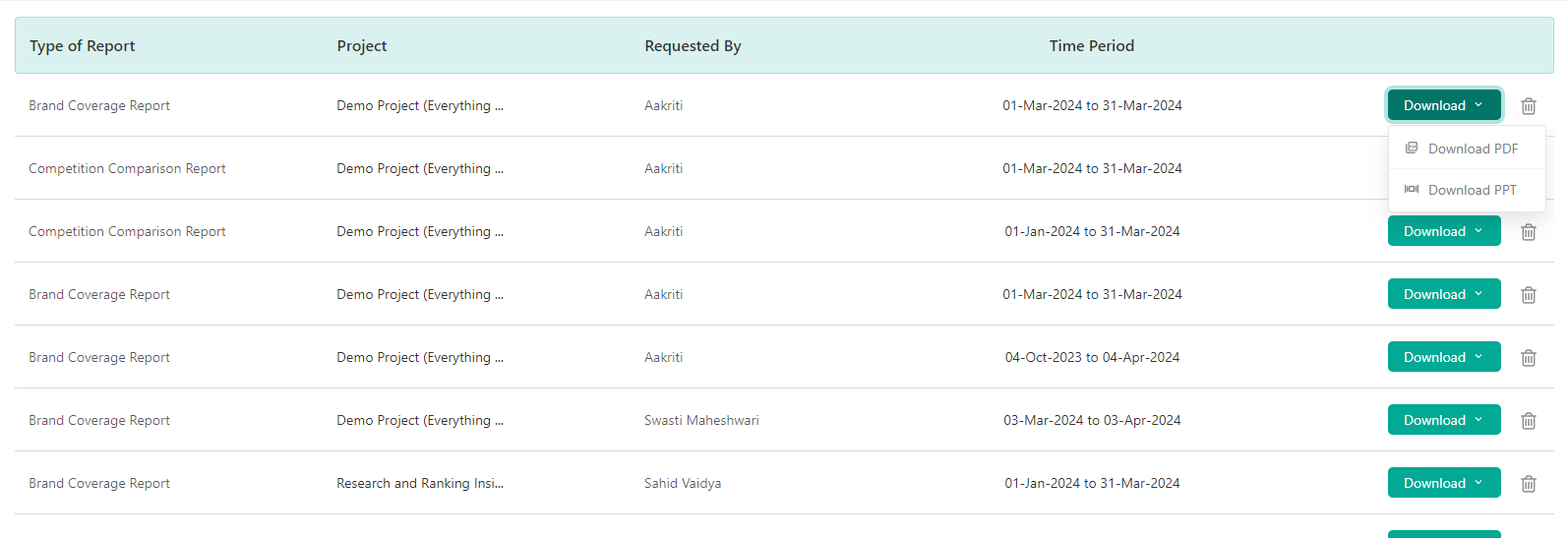
4. Voila! your PPT is ready to present!
With our new PowerPoint format for AI coverage reports, you’re not just presenting data; you’re telling a compelling story that could drive your business forward.
So, why not give it a spin? Transform your data analysis into captivating presentations that will leave your audience wanting more. Dive into your data, unleash your inner storyteller, and let those pie charts sing!
Apart from the PPT format, the reports are also available in RAW CSV and Excel Formats so that you can do thorough analysis in the offline mode as well.

Related Posts


Unified Media Monitoring: One Dashboard for News, Broadcast, Reddit and Facebook
Track news, Broadcast, Reddit and Facebook in one dashboard with unified media monitoring.

Broadcast Monitoring: Why PR Teams Need to Track Live TV Narratives
Track live TV narratives, competitors, spokespersons and alerts with Broadcast Monitoring.
All Stories
•May 22, 2026

How Much Does It Cost to Monitor Your Brand Online in 2026?
Brand monitoring costs can range from free alerts to enterprise media intelligence platforms. Here’s what affects pricing:
Unified Media Monitoring: One Dashboard for News, Broadcast, Reddit and Facebook
Track news, Broadcast, Reddit and Facebook in one dashboard with unified media monitoring.
Broadcast Monitoring: Why PR Teams Need to Track Live TV Narratives
Track live TV narratives, competitors, spokespersons and alerts with Broadcast Monitoring.
All Stories
•May 22, 2026
How Much Does It Cost to Monitor Your Brand Online in 2026?
Brand monitoring costs can range from free alerts to enterprise media intelligence platforms. Here’s what affects pricing:

Wizikey saves time by bringing relevant brand mentions from news, blogs, podcasts and other mediums in one place. It provides insights to build better awareness. It is built by communications' professionals who struggled with excel sheets, clunky software and decided to solve it themselves.


Contact Us
USA Office: 1441 Norman Drive, Sunnyvale CA 94087, USA
© 2026 Wizikey. All rights reserved